.svg)


.svg)




[[shortcode1 title="Quick Answer:" description="A Kitchen Display System (KDS) is a digital kitchen screen that receives orders directly from your Point of Sale (POS) system instead of relying on printed paper tickets. Orders appear in real time, allowing kitchen staff to view, prioritise, prepare, and complete them through a shared digital workflow. For restaurants with busy kitchens or multiple order channels, a Kitchen Display System can improve communication, reduce order errors, and provide better visibility throughout service."]]
Restaurant operations in the UAE have become more complex than simply serving dine-in guests. Orders can arrive simultaneously from tables, takeaway customers, and online delivery platforms, creating constant pressure on both front-of-house and kitchen teams. During busy periods, the challenge is not taking orders, but ensuring every order reaches the kitchen quickly, accurately, and doesn’t create confusion.
Whether you're running a busy restaurant, café, or other Food & Beverage business, improving kitchen communication often has a greater operational impact than simply adding new technology. According to the 2026 Restaurant Technology Benchmark Report, 62% of restaurant brands identified improving order flow across all channels as their top operational priority, highlighting the importance of connected restaurant workflows.
A Kitchen Display System is one way to help kitchen and front-of-house teams work from the same real-time order information.
This guide explains how a Kitchen Display System works, how it compares with traditional kitchen printers, and what to consider when deciding whether a digital kitchen workflow is the right fit for your restaurant.
Why Are More UAE Restaurants Moving Away from Paper Tickets to KDS?
For many years, printed kitchen tickets have been the standard way to send orders from the POS to the kitchen. If you have a smaller restaurant, with a simple menu and a single preparation station, this workflow can still be effective.
However, as restaurants grow, managing orders on paper becomes more challenging. Imagine orders pouring in from dine-in guests, takeaway collections, and online delivery orders at the same time. When the kitchen is relying on printed tickets, keeping track of priorities and order changes becomes increasingly difficult.
In such a situation, printed tickets usually don’t work because:
- These tickets get misplaced or damaged during service.
- New tickets are printed whenever an order changes.
- There is limited visibility into which orders are waiting, in preparation, or ready to serve.
- You have to rely on verbal communication between front-of-house and kitchen staff.
A digital kitchen workflow replaces these disconnected steps with a shared, real-time view of incoming orders. Instead of working from individual paper tickets, the entire kitchen can see the latest order information as it changes, making it easier to stay organised during busy service.
What Is a Kitchen Display System?
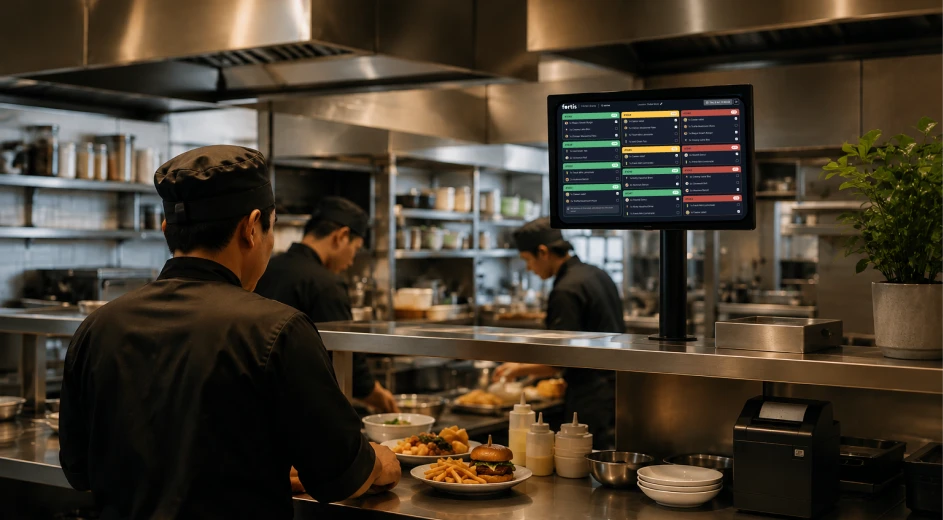
A Kitchen Display System (KDS) is a digital order management system that receives orders directly from your restaurant's Point of Sale (POS) system and displays them on one or more kitchen screens. Instead of relying on printed paper tickets, the kitchen works from a live digital order queue that updates as new orders arrive or existing orders change.
A typical Kitchen Display System allows kitchen teams to:
- View new orders as soon as they are placed.
- See item modifiers and special requests.
- Prioritise orders during busy service.
- Mark dishes or orders as complete.
- Keep front-of-house staff updated on order progress.
Unlike a printed ticket, which reflects the order only at the moment it is printed, a Kitchen Display System can update in real time when changes are made before preparation begins. So, there is no confusion caused by duplicate tickets, handwritten notes, or verbal updates.
The goal of a Kitchen Display System is not simply to replace paper, rather it creates a shared, real-time view of every order and lets kitchen and front-of-house teams work from the same information throughout service.
How Does a Kitchen Display System Work?
Although features vary between providers, most Kitchen Display Systems follow the same basic workflow.
1. An Order Is Entered into the Restaurant POS System
You enter the order into the POS, or it arrives through another connected sales channel such as online ordering or takeaway.
2. The Order Is Sent to the Kitchen
Instead of printing a paper ticket, the POS sends the order electronically to the kitchen display.
3. The Order Appears on the Kitchen Screen
Kitchen staff immediately see the order, including menu items, modifiers, and preparation notes. Depending on the system, orders can also be routed automatically to different preparation stations, such as the grill, beverage, or dessert station.
4. The Kitchen Prepares the Order
Staff work through the digital order queue while monitoring incoming orders and preparation priorities during service.
5. The Order Is Marked as Ready
Once preparation is complete, the kitchen updates the order status on the screen. Front-of-house staff can immediately see when an order is ready to be served or collected.
The overall restaurant workflow remains the same. The difference is that communication happens through a shared digital system rather than paper tickets, giving both kitchen and front-of-house teams better visibility throughout service.
Kitchen Display System vs Kitchen Printer: What's the Difference?
Both Kitchen Display Systems and kitchen printers help send orders from the POS to the kitchen. The difference is how those orders are managed once they arrive.
A kitchen printer produces a paper ticket that staff use throughout preparation. A Kitchen Display System shows the order on a digital screen, allowing the kitchen to view updates, track progress, and manage multiple orders from a shared display.
Neither option is automatically better. The right choice depends on how your restaurant operates.
Do Restaurants Still Need Kitchen Printers?
Yes. Many restaurants continue to use kitchen printers because they are simple, familiar, and work well in the right environment.
A kitchen printer may be sufficient if your restaurant:
- Has a single preparation station.
- Processes a relatively low number of orders.
- Rarely changes orders after they are placed.
- Is comfortable working with paper tickets.
As order volumes increase, paper-based workflows become harder to manage. Reprinted tickets, handwritten notes, and verbal updates can create confusion, particularly when orders arrive from several channels at the same time.
Some restaurants also choose a hybrid approach. For example, they use a Kitchen Display System for most kitchen operations while keeping a printer for labels, backup workflows, or specific preparation areas. This allows them to combine digital order management with paper where it still adds value.
Is a Kitchen Display System Right for Every Restaurant?
Not necessarily.
A Kitchen Display System is most valuable when the kitchen needs better visibility and coordination during service rather than simply replacing paper tickets.
It is often a good fit for restaurants that:
- Receive orders from multiple channels, including dine-in, takeaway, and online delivery.
- Operates several kitchen stations.
- Handle high order volumes during peak hours.
- Frequently update or modify customer orders.
- Want greater visibility into kitchen operations.
For smaller restaurants with a straightforward workflow, a kitchen printer may continue to meet operational needs. If the kitchen has a single preparation area and order volumes remain consistent, moving to a digital kitchen workflow may not deliver significant operational benefits.
The decision should be based on how your team works today and whether your current workflow supports the level of speed, visibility, and coordination your restaurant requires.
What Should You Consider Before Choosing a Kitchen Display System?
Not every Kitchen Display System is designed for the same type of restaurant. Before choosing a solution, focus on how it fits into your daily operations rather than comparing feature lists alone.
POS Integration
The Kitchen Display System should integrate with your restaurant POS system so orders move automatically from the front of house to the kitchen. Whether you use a traditional POS system or a SmartPOS solution, the goal is the same: reduce manual steps, minimise communication errors, and ensure the kitchen always works from the latest order information.
Support for Multiple Order Channels
Many restaurants receive orders from dine-in guests, takeaway customers, online ordering, and delivery platforms at the same time. A suitable solution should bring these orders into a single workflow, making them easier for kitchen staff to prioritise during busy service instead of switching between multiple sources of information.
Ease of Use
Kitchen staff need a system that is simple to learn and easy to operate under pressure. A clear interface with readable order details helps reduce mistakes and shortens staff training time.
Hardware Requirements
Some Kitchen Display Systems require dedicated commercial displays, while others work on standard tablets or compatible mobile devices such as Fortis KDS. Understanding the hardware requirements in advance helps you plan both your initial investment and future expansion.
Ability to Grow with Your Business
As your restaurant grows, your kitchen workflow may become more complex. Choosing a solution that can support additional preparation stations or higher order volumes can help you avoid replacing your system as your business expands.
Do You Need Dedicated Kitchen Display System Hardware?
Not always.
Some restaurants choose dedicated Kitchen Display System hardware because it is designed for demanding kitchen environments. Others prefer to use tablets or compatible mobile devices that provide the functionality they need with lower hardware costs. Depending on the solution you choose, you may be able to use existing compatible devices rather than investing in entirely new hardware.
The right choice depends on your kitchen layout, operating environment, and workflow rather than the display itself.
For restaurants looking to reduce reliance on paper tickets, there are different approaches to digital kitchen order management. Rather than using a traditional Kitchen Display System, some businesses choose workflows that send orders directly from a SmartPOS solution to a kitchen screen. For example, Fortis SmartPOS can send orders to a phone or tablet in the kitchen, providing a simple digital workflow without requiring a dedicated kitchen printer.
How Fortis KDS Keeps Your Kitchen Connected
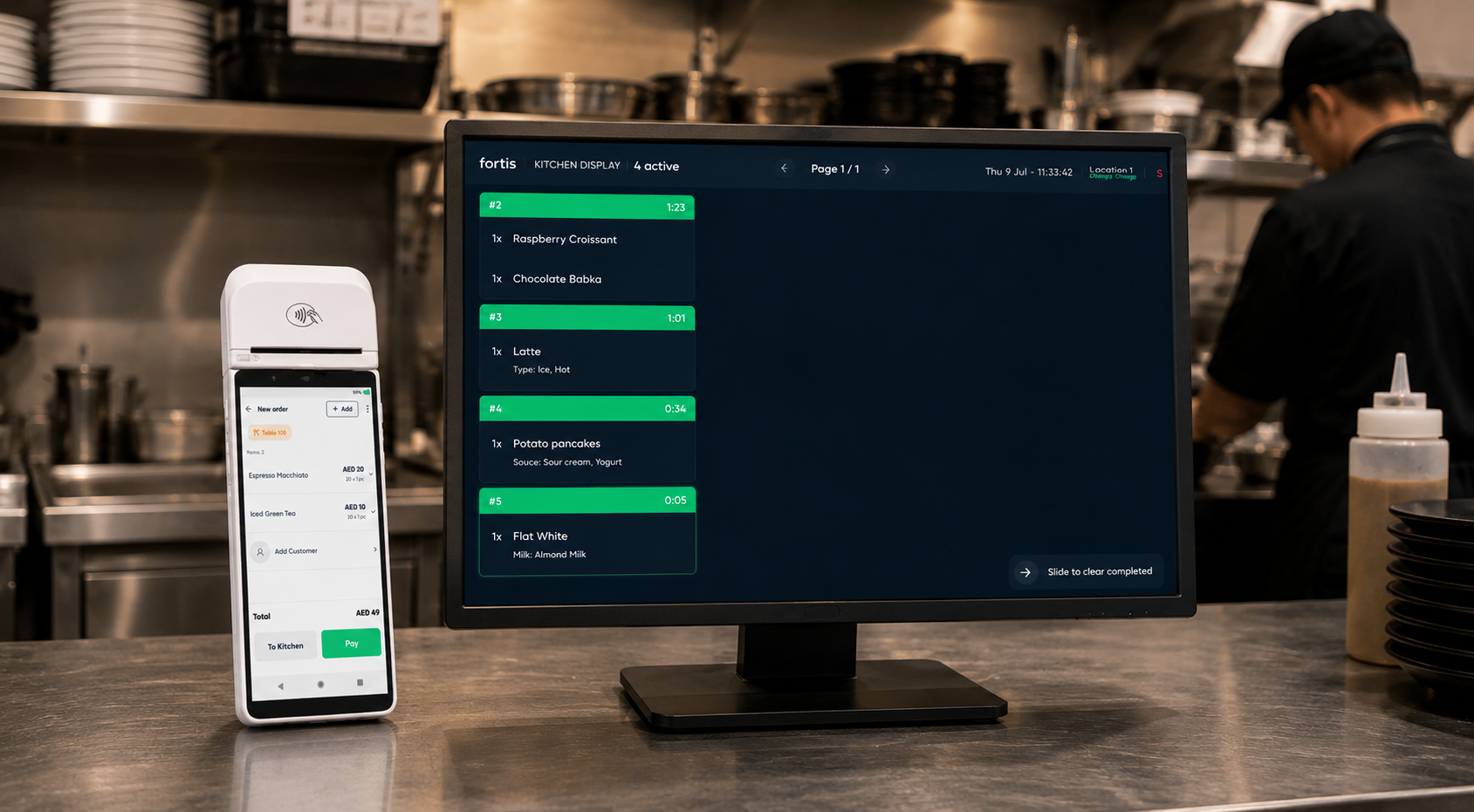
If you use Fortis SmartPOS for your restaurant, you already have access to Fortis KDS. It comes included as part of your F&B setup, so you don't need to buy or manage a separate kitchen display product.
Fortis KDS is a web based kitchen screen. You can run it on a laptop, tablet, or any screen with an internet connection, so you don't need to invest in dedicated commercial kitchen display hardware.
Here's how it works in practice.
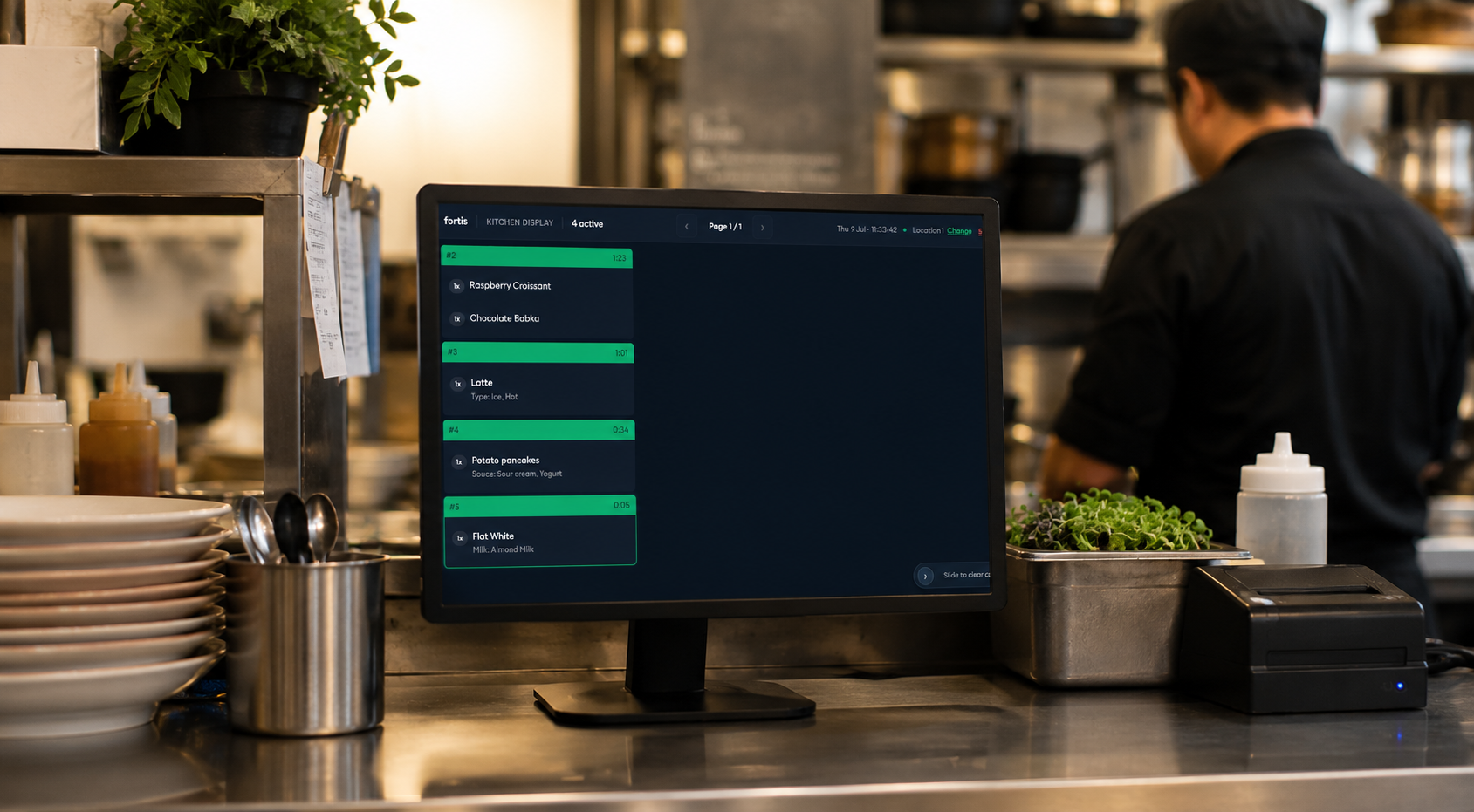
- When your staff send an order to the kitchen from the POS, it appears on the Fortis KDS screen instantly.
- Your kitchen team sees every item along with any notes attached to the order, such as "no ice" or a modifier change, so nothing gets lost between the front of house and the kitchen.
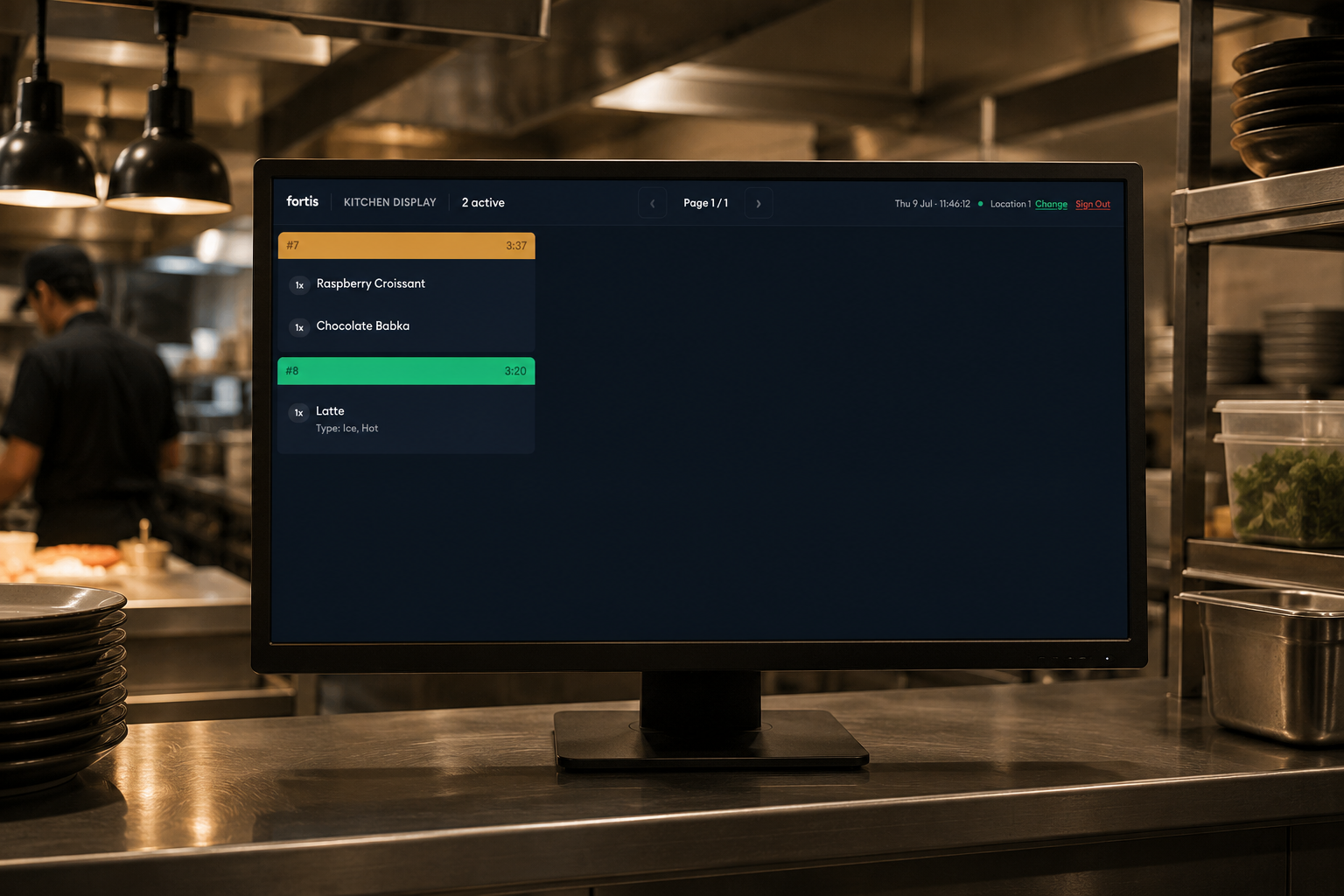
Fortis KDS also helps you stay on top of timing during busy service. Each order is time coded. If an order sits for too long, it changes colour, first to orange and then to red, so your team can immediately see which orders are falling behind and act on them before they affect the guest experience. Once an item is ready, your staff simply mark it as done and it clears from the screen.
For restaurants juggling multiple orders at the same time, this gives your kitchen one live view of everything in progress, without printed tickets, handwritten notes, or guesswork about what's been sent and what hasn't. Since Fortis KDS is built into Fortis SmartPOS, you get a connected kitchen workflow from the moment an order is placed to the moment it's marked ready, without adding another system to manage.
Final Thoughts
A Kitchen Display System is only one part of an efficient restaurant workflow. Many restaurants also look for connected tools such as inventory management, payment acceptance, and reporting to reduce manual work across the business. If you're looking to digitise kitchen operations without introducing unnecessary complexity, Fortis SmartPOS can send orders directly from the POS to a kitchen screen, helping your team reduce reliance on paper tickets while keeping the ordering process simple and connected.
For some restaurants, a kitchen printer may continue to be the right solution. For others, especially those handling higher order volumes or receiving orders from multiple channels, a digital kitchen workflow can make day-to-day operations easier to manage.
The best choice depends on your restaurant's workflow rather than the technology itself. Before investing in any solution, consider how orders move through your business today, where delays or communication issues occur, and whether a digital workflow would help your team operate more efficiently.
If you're looking to digitise kitchen operations without introducing unnecessary complexity, Fortis SmartPOS can send orders directly from the POS to a kitchen screen, helping your team reduce reliance on paper tickets while keeping the ordering process simple and connected.
Frequently Asked Questions
Q1. Is a Kitchen Display System better than a kitchen printer?
A. Not always. Kitchen printers are often sufficient for smaller restaurants with simple workflows, while a Kitchen Display System is generally better suited to restaurants managing higher order volumes, multiple preparation stations, or orders from several sales channels.
Q2. Can I use my existing POS system with a Kitchen Display System?
A. In many cases, yes. Most Kitchen Display Systems are designed to integrate with existing restaurant POS systems, but compatibility depends on the software and hardware you already use. It's worth confirming integration before choosing a solution.
Q3. Can I use a tablet instead of a dedicated Kitchen Display System?
A. Yes, many Kitchen Display System solutions support standard Android tablets or iPads instead of dedicated commercial displays. The best option depends on your kitchen environment, operational requirements, and the software you choose.
Q4. How much does a Kitchen Display System cost?
A. Costs vary depending on the software, hardware, and number of kitchen stations. As a general guide, restaurants should expect to budget for display hardware and an ongoing software subscription, with larger or more advanced setups costing more than a single-screen installation.